Corel Ventura
4.2,5,7 & 8 evaluation sheet
In reference to Autocad
12 and 14 compatability
by cristofer morley
Through years of working with Ventura 4.2, 5(F5)
& 7 (and now V8) and Autocad 12 & 14, I believe I've tried
EVERYthing to get these two programs to work (or not) with each others. Below
is a detailed description of my adventures.
Latest evaluation on V8
NOTE: All tests were done on a Pentium
166 with 64 megs ram in Win95. All tests were done in comparison with Ventura
4.2 that performs good under Windows 95, but is a little shaky around
the edges, and must be periodically re-installed.
-
Although both new versions (5 & 7) look
extremely well and have many up to date functions they BOTH have one glaring
drawback; they do not work (for all practical purposes) with windows metafiles
(*.Wmf) generated from AutoCad Drawings. This is the basis for our Technical
Manual Publishing.
-
Ventura 7 will load Acad Dxf files(after several
minutes!) but the text within the Dxf file is always scaled wrong and is
unusable. All manual pictures have text and or number balloons to show
part locations, and any OFF scaling is unacceptable. In addition to the
scaling problem, the new Ventura creates a HUGE plot spool (generally 20
megs a page). This bogs down the computer to a virtual stand still for
at least 20 to 30 minutes wile the system tries to deal with this massive
plot file. Plotting an entire chapter of 60 to 70 pages is unthinkable.
Ventura 4.2 by comparison would spool and plot the same page in
20 to 30 SECONDS.
-
Ventura 7 will not load the Wmf's created
with Ventura 4.2 (as converted from Acad12 copyclip command).
With chapters in the 60 to 70 page range, re-copying and pasting 30 to
40 pictures would be an all day job. (assuming Ventura 7 worked
with ANY Wmf's, which it doesn't)
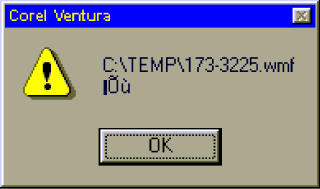
-
Ventura 7 faults out with the above dialog
after attempting (for many minutes) to load a NEWLY created Wmf from Acad12.
Acad14 has it's own problems with creating Wmf's. (more on that,
below)
-
Ventura 7 makes it very impractical to view
a Wmf that you have on a page. Showing the Wmf (from it's hidden state)
takes several minutes. (Actually, I'm using a Dxf for comparison since
Ventura 7 won't load a Wmf from Acad at all.) Ventura Tech
Support told me that this slowness was do to Ventura 7 actually
loading the Wmf's in Memory for Editing purposes (though the file can't
actually be changed at all - nor would you have reason to do so.). Obviously
no one at Corel tested Ventura 5 or 7 with AutoCad files……. Ventura
4.2 shows the same Acad12 wmf in 3 to 10 seconds.
-
Another option I tried was to copy the drawing to
the clip board and paste it directly into Ventura 7. This worked
with Acad12 (but NOT with Acad14) , but each file you paste
in to Ventura 7 this way (you can't externally reference a file
this way in the new Ventura 7) it adds approximately ONE MEG to
the Chapter file. With a 60+ page chapter, it quickly grows to unmanageable
(and unprintable with plot files of 20 megs per graphic page!) proportions.
-
Ventura 4.2 would let you save the Paste (from
Acad12) as a referenced Wmf, and worked perfectly.
-
Another option I tried was to copy a Bitmap of the
drawing to use in the manual. However this produced a blocky, unacceptable
picture (the fine line art of the Wmf emulates the original drawing exactly).
-
I've been working with Windows since it's inception
and AutoCad since version 2.6 and I believe I've tried everything under
the sun to make Ventura 5 & 7 work, but to no avail (some success
with Acad14 and V5 -see below). It's obviously designed to work with simple
graphics (bitmaps) and not Line art Based (AutoCad wmf). This makes it
a fine program for magazines, but a poor choice for Technical Manuals.
-
This is unsettling since Ventura 4.2 is some
what unstable and must periodically be re-installed to continue functioning
correctly.
-
I've been through all the same tests with Ventura
5, with similar unsatisfactory results. This evaluation is for the
record and for reference purposes (should anyone attempt to use either
of these versions in the future). The options, at this point are to change
to Adobe Pagemaker (how ever painful that may be), or wait for yet another
version of Ventura. This way the change over would be at OUR timing
and convenience. The other option would be to continue using Ventura
4.2 and hope Windows doesn't change it's operating platform anymore.
Since the release
of Acad14 I've re-installed Venturas 5 & 7 and redone ALL the above
tests, with varying degrees of success.
- I had hoped with the new Acad14 that my problems getting an Acad
wmf into these programs were over. Not exactly. Acad14 no longer supports
the Copyclip command (it's the same as the CopyLink command) that worked so
well getting Acad wmf's into other programs. Now the same command give you
the entire current view, regardless of how few entities you've selected! What
that means is when you insert the Acad14 wmf into your desktop software
you get (as an example) a large black rectangle with your entities in the
middle. This wmf is an exact representation of the display window you were
working with in Acad14, NOT the entities you selected for export! Of
course, this is useless. Go figure.
- After long searching on the internet, I came up with a great little file
called Bwmfout.arx. Get it! This little file saved my butt! The good
news is that this program gives you back the exported wmf's (from Acad14)
that Acad12 used to do. This third party *free* utility fixed the goof
up in Acad14. It gives you a wmf that Ventura 4.2 converts to
placeable wmf and works just like the Acad12 wmf to Ventura 4.2!
This new file also imports directly into Ventura 5!
- Ventura 5 does NOT like ANY wmf's created with Acad12 wmf
to Ventura 4.2! But with the Bmfout.arx command used in Acad14,
it's a simple matter of exporting the drawing to the wmf name of your choice,
and then importing it directly into Ventura 5. So we're at least half
way home.
- Even with this fantastic little utility (Bwmfout.arx) Acad wmf's
STILL do not import correctly into Ventura 7! For some reason, in Ventura
7 you get a transparent wmf (as you should) but you still get a rectangle
of the view you had in Acad14, and it is NOT resizable in Ventura.
However, the new Bwmfout wmf from Acad14 works in EVERY other
publication I've tried! So, another strike out for Ventura 7.
- I appears obvious to me that Ventura 5 AND 7 were never tested with
ANY version of AutoCad. Considering the very large number of technical
manuals out there that are produced with AutoCad, this is very confusing.
I've spent months trying to find answers to the Ventura 7 / Autocad problem
but all I get is 'try the next version', or resize the Autocad window-change
your background color to white THEN export. This is a ridiculous solution
and gives you wmf's of varying sizes that look amateurish in a professional
publication. Well, I WILL try the next Ventura version (V8) only because the
upgrade is $99 until June. You can be sure I'll report on that when it arrives,
So check back!
Regarding V5 to Ventura 8 (and Autocad files):
Some basic notes on Ventura 8
The notes below are regarding how well Ventura works with Autocad and not necessarilly
how ventura works in general. I'll have more as I continue working with V8 (looks
like a kick-ass version tho!)
1.) Ventura 4.2 chapters (with Acad12 imported wmf's) import fine.
2.) Ventura 5.0 chapters (with Acad14 (Bwmfout wmf's) import fine.
3.) V5 doesn't work with Acad12 wmf's. (see http://www.benway.com/misc/ventura-acad.shtml)
4.) Wmf's from Acad12 don't import correctly into Ventura 8. V8 tries,
but the resulting import is missing many lines. (I don't blame Corel for this,
Acad12 exports an old 16bit wmf.)
5.) Wmf's from Acad14 import into Ventura 8 but Acad14 gives you the
whole display with background color (see http://www.benway.com/misc/ventura-acad.shtml)
6.) Using Bwmfout.arx from within Acad14, the resulting exported Wmf's
out work perfect in Ventura 8. (ironically, Ventura 8 finally has the same functionality
with Acad that it did with Ventura 4.2!) And now you can go back to externally
linking the Wmf, instead of Pasting it into your publication, as you had to
do in V7 (because V7 didn't import the Acad14 wmf's correctly (acad14's OR Bwmfout's)
The Wmf export problem now lies solely with Autocad 14, thus the need for the
third party Bwmfout program to bring back this basic function to Acad that Autodesk
screwed up with Acad14. They've heard from me about this many times :o)
7.) Ventura 7 imports V5 chapters fine, but any repeating frames (like
with the page # tag) don't work. In V7 your repeating frames with the [P#] code
would show just that on all pages. Any Acad14 Wmf's that you might have in you
pub also don't work. Ventura 8 seems to have fixed these problems.
8.) Tables seem to import better in V8 than in V5 OR V7. They seem to
hold on to the original format/tags settings better in V8.
9.) Ventura 8 prints many times faster than V7 OR V5. It seems that
Corel worked towards V4.2 speed as a goal for V8, and it's VERY impressive.
10.) It has been very discouraging for us Acad/Ventura users over the
years to see each successive version of Ventura (since 4.2) work worse and worse.
Creating many headaches as we've tried to find workarounds and fixes. Ventura
8 seems to have fixed most everything... It appears the Corel has been reading
the NewsGroups!
no part of this article is to be used without permission.
site by cristofer morley. all
rights reserved. 07-07-98